


 İnstagram
 Facebook
How Professional UI UX Design Helps Solopreneurs Scale a Digital Business
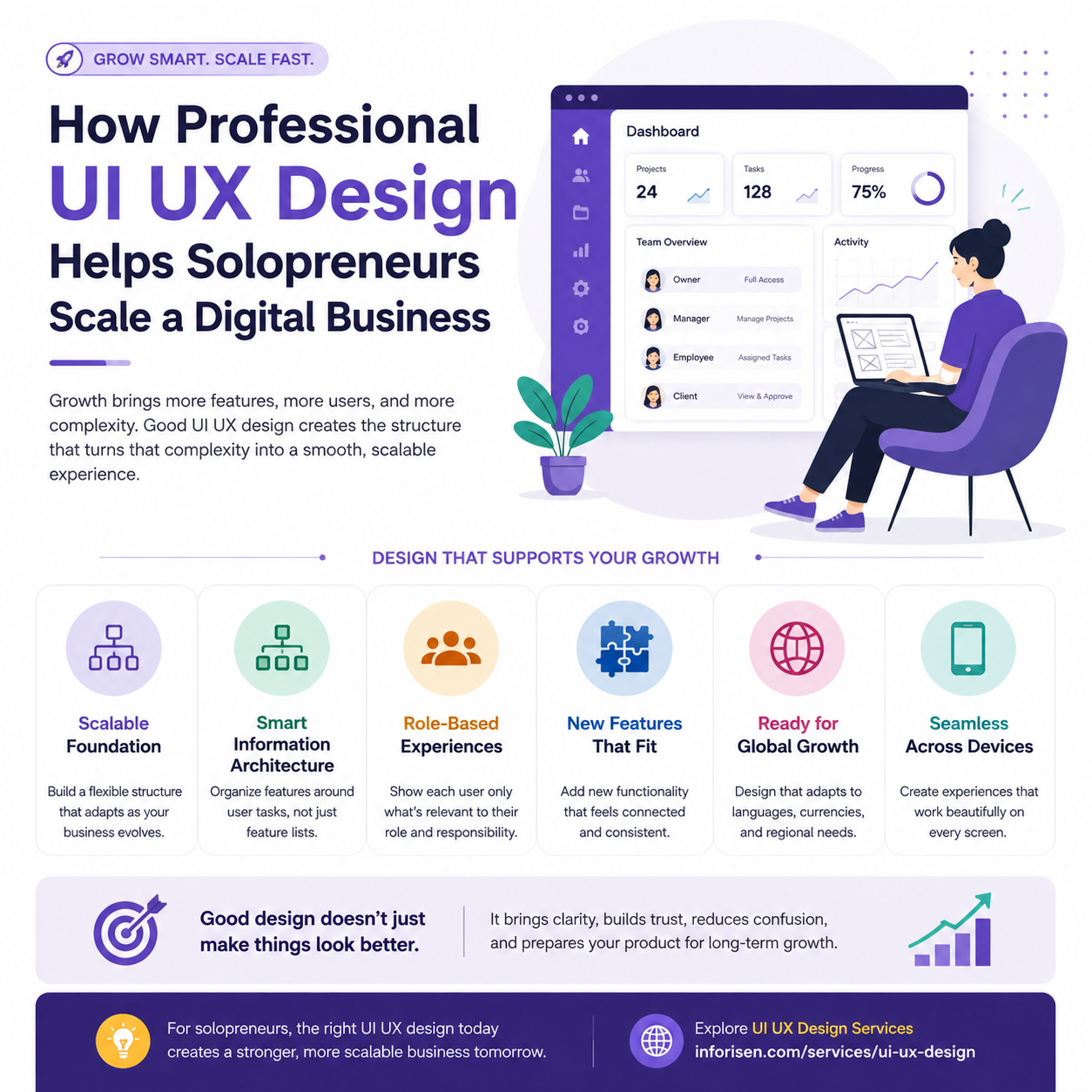
A solopreneur business often begins with a simple digital setup. There may be one primary service, one customer type, one pricing model, and only a few important features to manage. At this stage, the founder usually understands every part of the business personally, so making decisions about the product, website, and customer experience feels relatively straightforward.
That simplicity rarely lasts when the business starts growing. More customers bring different expectations, new features are requested, subscription plans become more complex, team accounts may become necessary, and integrations with other tools start to matter. The founder may also begin working with freelancers, developers, marketers, or support staff, creating more people and processes around a product that was originally designed for one person.
Professional UI UX design helps solopreneurs manage this transition without allowing the product to become cluttered or difficult to use. Instead of adding every new requirement as an isolated feature, UX creates a structured way to organize navigation, user roles, information, workflows, and reusable interface elements. The purpose is not to predict every future need, but to build a digital experience that can evolve without requiring major redesign every time the business changes.
Growth Creates More Than Just New Features
Scaling a digital business is rarely as simple as adding more functionality. A new feature can affect onboarding, navigation, account permissions, billing, notifications, support, and even the way existing features work together. What appears to be one small product request can therefore influence several parts of the user experience.
Consider a project-management platform originally built for individual freelancers. In its earliest version, one person may create projects, manage tasks, communicate with clients, send invoices, and control all account settings. Because there is only one user type, the experience can remain simple and relatively easy to organize.
Now imagine that agencies begin using the same platform. The product may suddenly need account owners, managers, employees, contractors, and client accounts. Some users need access to financial information, while others should never see billing details. Managers may require project reports and team performance data, employees may only need assigned tasks and files, and clients may only need approvals, progress updates, and communication tools.
At that point, the product has not simply gained a “team account” feature. Its entire structure has become more complex. If the original experience assumed that one user could see and control everything, adding these new requirements may force major changes to navigation, permissions, dashboards, and account settings. Professional UX design helps reduce that risk by creating a structure that can adapt as the business begins serving more complex customers.
Scalable UX Creates Flexibility Without Making the Product Complicated
There is an important difference between designing for growth and overengineering a product. Solopreneurs can make mistakes at both extremes. A product designed too narrowly may become difficult to expand, while a product designed for every imagined future scenario may become expensive and confusing before the business has even validated those needs.
A better approach is to create a flexible foundation that supports current users while leaving reasonable room for future changes. A professional UI UX design service can help establish clear information architecture, reusable interface patterns, logical navigation, and adaptable components without adding unnecessary complexity to the first version.
For example, a dashboard can remain focused on the needs of today's users while still being structured in a way that can support additional roles later. Navigation can remain simple while grouping features logically enough that new functionality can be added without turning the menu into a long list of unrelated options.
Scalable UX is therefore not about building a bigger product from the beginning. It is about making thoughtful design decisions that allow the product to grow without damaging usability.
Information Architecture Becomes More Important as the Product Expands
When a digital product contains only a few features, users can often find what they need even if the structure is not perfect. As the platform expands, poor organization becomes much more noticeable.
One common problem is feature accumulation. A reporting tool is added to the navigation because there is space available. Later, billing, integrations, automation, team settings, exports, and several customer-requested tools are added in the same way. Over time, the menu becomes a collection of features rather than a meaningful representation of how users work.
Good information architecture prevents this by grouping related functionality around user tasks. Billing history, payment methods, invoices, and subscription settings may belong together. Projects, tasks, files, and collaboration tools may form another logical area. Security, permissions, and organization settings may require a separate structure.
This organization makes a growing product easier to understand because users can predict where information is likely to be located. They do not need to memorize where every individual feature was added, and new customers can learn the product more quickly.
For solopreneurs, this becomes increasingly valuable as the platform grows. A well-organized product reduces confusion, improves onboarding, and makes future expansion easier to manage.
Different User Roles Need Different Experiences
As a solopreneur business grows, the audience often becomes more diverse. A product that initially served one account owner may later need to support managers, employees, freelancers, clients, administrators, or business partners. Giving every user the same dashboard and the same level of access can quickly create an unnecessarily complicated experience.
Each user enters the platform with a different purpose. A business owner may want access to billing, analytics, organization settings, security, and overall team performance. A manager is more likely to focus on project progress, deadlines, resource allocation, and employee activity. Employees may only need their assigned tasks, communication tools, and relevant files, while clients may simply need project updates, approvals, shared documents, and messages.
When all of these functions appear inside one interface, users are forced to work around tools that have little relevance to them. A better approach is to design around roles and responsibilities. The owner can access business-wide controls, managers can work with operational information, employees can focus on execution, and clients can enter a much simpler environment designed around communication and approval.
Role-based UX also supports better control over sensitive information. If a client can access internal financial settings or an employee can view company-level account controls, the issue is no longer just usability. It becomes a security and permission concern.
A scalable experience therefore does not show every feature to every user. It gives each person access to the information and actions that match their responsibilities, allowing a sophisticated product to remain focused and understandable.
New Features Should Fit the Product Instead of Feeling Added On
Successful digital products often evolve because customers request new capabilities. Listening to those requests is important, but adding every feature independently can eventually damage the experience.
Imagine a platform that gradually introduces calendar integration, advanced analytics, file sharing, messaging, automation, custom reports, and team management. If each feature is designed without considering the existing experience, the product can begin to feel like several different applications placed inside the same interface.
Navigation may behave differently between sections, button styles may become inconsistent, terminology may change, and newer screens may follow different patterns from older ones. Over time, this creates design debt that makes the product harder to understand and maintain.
Professional UX design evaluates each new feature as part of a larger system. Designers consider where the functionality belongs, which existing patterns can be reused, how the feature affects current workflows, and whether another part of the interface needs to be simplified at the same time.
This creates a more connected product experience. Growth becomes a planned evolution rather than a collection of patches.
Design Systems Help Maintain Consistency as More People Join the Business
A solopreneur may initially maintain visual consistency simply by remembering how the product is supposed to look. That becomes much harder when developers, freelancers, marketers, agencies, or new employees start contributing to the same product.
Without shared design standards, small inconsistencies can spread quickly. One page may use a different button style, another may introduce new spacing rules, forms may behave differently between screens, and status messages may use inconsistent colors or terminology.
A lightweight design system helps create a shared language for everyone working on the product. It can define typography, colors, spacing, buttons, forms, cards, tables, alerts, modals, navigation, and other commonly repeated components.
For a solopreneur, the system does not need to be large or complicated. Even a focused collection of reusable patterns can reduce repeated decisions and make future design work more efficient. When a new feature is introduced, the team can reuse established components instead of designing common elements from scratch.
This improves consistency for users and can also make development faster because designers and developers are working from the same set of interface rules.
Technical Architecture Must Grow Alongside UX
A scalable user experience cannot be created through visual design alone. Many UX decisions have deeper technical implications that need to be considered during development.
Adding multiple user roles may require more advanced permission logic. Team accounts can affect how data is stored and shared. International billing may require support for different currencies. New integrations can introduce APIs, authentication, synchronization, and error-handling requirements.
This is why UX and development should evolve together. Working with an experienced software development company can help connect product experience decisions with the technical architecture required to support them.
For example, a designer may create a simple interface that allows an account owner to assign roles to team members. Visually, that screen may look straightforward. Behind it, developers may need to define detailed rules controlling who can view, create, edit, delete, approve, export, or manage different types of information.
Discussing these requirements early helps the team identify technical limitations before they become expensive. It also reduces the risk of creating a polished interface that is difficult to implement or maintain at scale.
Growing Products Need More Thoughtful Onboarding
A simple product with only a few features may require very little onboarding. As functionality expands, new customers often need more guidance, but adding a long tutorial is rarely the best solution.
Users usually want to reach value quickly. They do not want to study every feature before they can begin using the product.
A better approach is progressive onboarding. New customers can first be guided toward the main task that delivers value, while more advanced capabilities are introduced later when they become relevant. In a project-management platform, for example, the first experience may focus on creating a project, adding a task, and inviting a collaborator. Advanced reports, automation, integrations, and permission controls can be introduced later.
Onboarding may also need to change for different roles. A client does not need the same introduction as an administrator, and a manager may need different guidance from an employee. Contextual onboarding helps a growing product remain manageable because each user learns what is relevant to their responsibilities rather than being shown the entire platform at once.
International Expansion Brings New UX Requirements
Solopreneurs who expand into new markets often discover that localization involves much more than translating words.
Different languages can require significantly different amounts of space. A short English button label may become much longer after translation, and some languages use right-to-left layouts. Date formats, time zones, currencies, telephone numbers, and address structures can also vary between regions.
A rigid interface can struggle under these conditions. Flexible components, responsive layouts, and well-structured forms make international expansion easier because the product is less dependent on one specific language or formatting convention.
Localization can also influence customer expectations. Payment processes, form structures, communication styles, and account settings may need to adapt to regional preferences.
Solopreneurs do not need to design for every international market from day one. However, if global growth is part of the long-term strategy, avoiding overly rigid design decisions can reduce the cost of entering new markets later.
Mobile Usage Can Change as the Customer Base Grows
A product's device usage may also change over time. An early B2B platform may initially be used mainly on desktop, especially if its first customers work from offices. As the customer base grows, users may want to approve work, check progress, respond to messages, review reports, or update tasks from mobile devices.
That does not mean every desktop feature should simply be compressed into a smaller screen.
Mobile users often have different priorities. A manager may only need to approve a task or check project status while away from the office. An employee may need to update progress or upload a file. A client may want to review a deliverable and leave feedback quickly.
Professional UX identifies these high-value mobile journeys and adapts the experience around them. This allows the product to become more useful across devices without creating an unnecessarily complicated mobile interface.
A UX Roadmap Helps Prevent Reactive Design
Most growing digital businesses maintain some form of product roadmap, whether formal or informal. It may include upcoming features, team functionality, integrations, mobile development, new pricing plans, or international expansion.
UX should be considered alongside these priorities.
If team accounts are planned, designers can begin thinking about roles, permissions, onboarding, navigation, and account settings before development starts. If international expansion is approaching, existing components can be tested against longer translated text and different regional formats. If mobile usage is becoming more important, the team can identify which workflows deserve priority on smaller screens.
This does not mean completing every design months in advance. It means recognizing that major business decisions usually create user experience consequences.
A UX roadmap makes the design process more proactive, reducing the need to solve every problem only after it becomes urgent.
Scaling Should Add Capability Without Adding Unnecessary Complexity
A growing digital product will naturally become more powerful, but that does not mean every user should be exposed to every new capability.
Advanced settings can remain available without dominating the main interface. Specialized tools can appear only for customers who need them. Complex controls can remain hidden until the relevant workflow requires them.
This approach allows the product to expand while keeping individual experiences focused.
A platform may eventually support hundreds of capabilities behind the scenes, while each user interacts with only the small portion that matters to their work. That is not a limitation. It is often a sign of good UX.
The product feels simple not because it has fewer features, but because each person sees a more relevant experience.
Regular UX Reviews Help Control Design Debt
Even a well-designed product needs regular review. No initial design can perfectly anticipate every customer request, market change, or business decision.
As the product evolves, solopreneurs should periodically evaluate the complete experience rather than only reviewing the newest feature. Navigation may have become crowded, similar tools may exist in different locations, older screens may no longer match newer ones, or customers may repeatedly contact support because important functionality is difficult to find.
Sometimes the right response to growth is not adding another feature. It may be reorganizing an existing section, simplifying a workflow, combining related tools, or removing functionality that no longer provides enough value.
Regular UX reviews help prevent temporary solutions from becoming permanent design problems.
Reusable Components Make Expansion More Manageable
Reusable interface components become increasingly valuable as a digital product grows. A team should not need to invent a new design every time it needs a button, form, card, alert, modal, table, or navigation pattern.
Using established components saves design and development effort while also creating familiarity for users. Once customers understand how one type of interaction works in one part of the product, they can apply that understanding elsewhere.
The GOV.UK Design System component library provides a useful example of how reusable interface patterns can maintain consistency across complex digital services. Solopreneurs do not need a design system at the same scale, but the underlying principle remains valuable: common interface problems become easier to manage when consistent solutions already exist.
Professional UI UX Design Makes Digital Growth More Manageable
Growth almost always introduces complexity. More customers create different expectations, new user roles require better permissions, additional features affect navigation, and international markets introduce new design requirements.
Professional UI UX design does not remove that complexity. It gives the business a structured way to manage it.
A scalable digital experience gives new functionality a logical place, keeps navigation understandable, adapts to different users, maintains consistency, and provides enough flexibility to support future changes. Instead of continuously patching an increasingly complicated product, the founder can make decisions within a clear experience framework.
For solopreneurs, this can have a direct business impact. Better UX can reduce unnecessary redesign work, improve onboarding, make development easier to manage, support larger customers, and create a more professional experience as the business grows.
The strongest digital products rarely remain as simple as their first version. That is often a sign that the business is succeeding. The challenge is making sure the user experience evolves at the same pace.
Professional UI UX design helps solopreneurs move from a product that works for today's customers to one that is structured to remain usable, manageable, and scalable as the business becomes larger and more ambitious.

 Türkçe
 English
 Arabic
 Deutsch